PESI’s Zoom Checklist for Speakers
If you have questions about these requirements, please contact AJ at amoen@pesi.com.
Internet Requirements
1) An internet connection – wired or wireless broadband
- Wired (Ethernet) broadband preferred
- No 3G/4G/LTE connection unless prior approval
- No mobile hotspot connection unless prior approval
2) Any connection must meet the below speed specifications
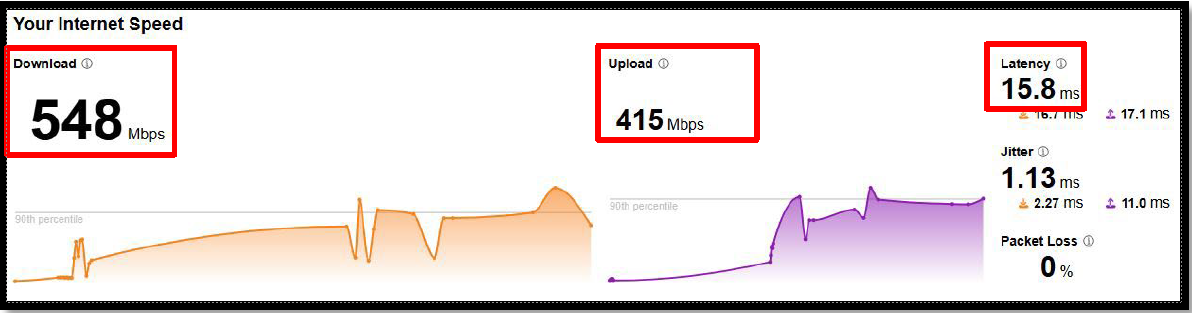
- Bandwidth speed tests should be performed where you’ll be presenting from and can be performed at speed.cloudflare.com. Please click here to perform this test. This will pull up the test webpage and the test will automatically be performed.
- Please email the download speed, upload speed, and latency to AJ at amoen@pesi.com as soon as possible.
- If this location changes in the future, a new test will be needed at least 2 weeks prior to your event date.
- Results should be:
- Minimum Download Speed: 3Mbps
- Recommended: 5Mbps or higher
- Minimum Upload Speed: 3.8Mbps
- Recommended: 5Mbps or higher
- Latency of 150ms or less
- Minimum Download Speed: 3Mbps
- Bandwidth speed tests should be performed where you’ll be presenting from and can be performed at speed.cloudflare.com. Please click here to perform this test. This will pull up the test webpage and the test will automatically be performed.
Content Requirements
1) Copyrighted Material
- You agree you will not use any copyrighted material in your presentation without the
proper permission granted to you prior to the event date- Note: YouTube videos are not all fair use
- Note: Your PESI host may recommend you skip videos you do not have the
rights to.
- You agree you will not use any copyrighted material in your presentation without the
2) Slide Deck/Attendee Handout
- If you plan to share a slide deck with the attendees, please make sure your
presentation software (Powerpoint, Keynote, etc.) is up to date.
- If you plan to share a slide deck with the attendees, please make sure your
3) Orientation Call for New Speakers
- If this is your first digital event using Zoom with PESI, we ask that you attend an
orientation and onboarding call lasting between 30 and 60 minutes. - During this call you and a PESI webinar host will cover:
- commonly used Zoom features
- discuss PESI specific event preferences
- go over what your event day will look like
- will double check to ensure all required specs and agreements have been
properly met
- We would like all first time PESI speakers to attend an orientation call to avoid issues
the day of your event.
- If this is your first digital event using Zoom with PESI, we ask that you attend an
Device Requirements
1) A desktop or laptop must be used for your event
- Your desktop or laptop must be in proper running order. You agree to address and
resolve any known hardware or software issues prior to your event date.
- Your desktop or laptop must be in proper running order. You agree to address and
2) Installation and use of the latest version of Zoom available for your event is required.
3) Approved Operating Systems:
- macOS X with macOS 10.9 or later
- Windows 10*
Note: Devices running Windows 10 must run Windows 10 Home, Pro, or Enterprise. - Windows 8 or 8.1 is no longer supported
- Windows 7 is no longer supported
4) Supported Tablet and Mobile devices are approved only as secondary devices. Approved
secondary devices are:
- iOS 8.0 and Android 5.0 (and newer) devices
- Surface PRO 2 or higher, running Windows 10 or higher
- Note: Tablet PCs running Windows 10 must run Windows 10 Home, Pro, or Enterprise.
- Note: Tablet PCs only support the desktop client.
- Note: Any device with a 7” display or smaller will have limited functionality
5) Processor and RAM Requirements:
- Minimum Processor: Single Core 1Ghz or higher
- Recommended Processor: Quad Core 2.4Ghz or higher
- Single and dual-core devices have a reduced frame rate when screen
sharing (around 5 frames per second). For optimum screen-sharing
performance and higher attendee satisfaction, we highly recommend a
quad-core processor or higher. Examples include Intel’s i3, i5, i7, i9 series
and AMD equivalents.
- Single and dual-core devices have a reduced frame rate when screen
- Recommended Processor: Quad Core 2.4Ghz or higher
- Minimum RAM: 4GB (any bus speed)
- Recommended RAM: 16GB DDR3/DDR4/DDR5
- Minimum Processor: Single Core 1Ghz or higher
Peripheral Requirements (Camera, microphones, displays, etc.)
1) Speakers and a microphone – built-in, USB plug-in, or wireless Bluetooth
2) An HD webcam - built-in or USB plug-in
Note: See the list of supported devices.
3) If your slide deck contains notes and you want to use Presenter View to view those notes and
upcoming slides, a 2nd display (monitor) is recommended.